
THE COMPUTER SYSTEM
Understanding System
The system is derived from Latin (Systema) and Greece (Sustema) is a Union made up of components or eleven are linked together to facilitate the flow of information, material or energy. The system is also the unity of the parts which are interconnected in an area as well as having items movers.
Understanding Computer
The computer is a tool that is used to process data according to procedures have been formulated. Computer Word originally used to describe people whose arithmetic calculations do its work, with or without tools, but the meaning of the word is then transferred to the machine itself.
Understanding Computer Systems
The computer system is the set of elements of the computer (hardware, software, brain ware) interconnected (integrated) and interacting to perform data processing with the purpose of producing information as expected.
Computer devices should be enabled in Comprehensif (compact and together) in carrying out its task, namely in process data or information. To realize the conception of the computer as data processing in order to produce an information system is required, then the computer (computer system) that the element consists of hardware, software, and brain ware. The third element of the computer system must be interconnected and form a unity which support each other to work together. The hardware will not function without the software, and vice versa. And both of them would not be helpful if no human (brain ware) operating and control it.
Computer operating systems are computer software or software that is in charge to perform the control and management of the hardware and also the basic system operations, including running software applications such as data processing programs that can be used to facilitate human activities. Operating systems in English called the Operating System, or in short the OS.
Computer operating system software on the first layer is placed on computer memory, (computer memory in this case there is a hard drive instead of ram memory) when the computer is turned on. While other software's to run after the operating system your computer runs, and the operating system of the core public service will do for that software. The common core services such as access to disks, memory management, task, scheduling and advance users. So each of the software no longer need to perform tasks that common core, because it can be catered for and performed by the operating system. The section of code that perform the core duties and the General called the kernel of an operating system.
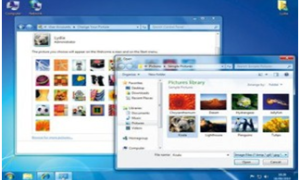
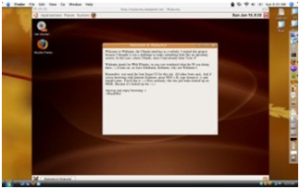
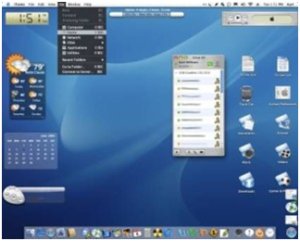
The operating system serves as a liaison between the layers of hardware and software layers. In addition, computer operating systems also do all the important commands commands in a computer, as well as ensure that different applications can function simultaneously runs smoothly without a hitch. Computer operating systems ensures the other software applications can use memory, input and output performs against other equipment, and had access to the file system. If multiple applications are running simultaneously, then the computer operating system will set up the appropriate schedule, so as much as possible all the processes on a computer that runs get enough time to use the CPU and do not interfere with each other with another device. Here is an example of computer operating systems such as Windows, Linux, Mac OS, and others. Below is the look of the Windows 7 operating system interface, Linux (Ubuntu) and Mac OS X.
• Display interface of windows 7
• Display interface Linux Ubuntu
• Display of the Mac OS X interface
Computer components
Components – components in a computer system is divided into 3 parts that cannot be separated as follows:
1. Hardware (Hardware)
a. Processing Device
b. Input Device
c. Output Device
d. Storage Device
2. Software (software)
a. Operating System
b. Application Program
c. Language Program
3. Brain ware (the person who operates the computer)
COMPUTER HARDWARE
Computer equipment that physically could be seen and could be touched grouped in groups of hardware. From the start he found computers, hardware can be classified into 4 groups, namely:
1. The tool Manual
2. mechanical Tools
3. Electronic mechanical device
4. Electronic device
The computer we see today is the change from generation to generation, from the first up to the fourth generation. The physical form of the computer generation I very big now, because almost all components using Vacum Tube.
Thanks to the tenacity of a man, who used a large computer until now that we see are small and can be moved everywhere, the components therein using LSI (Large Scale Integration) i.e. compacting thousands IC.
The current generation of computer basically consists of:
1. INPUT DEVICE
The input Device is a device used to receive input, now included in the Group of input device that is:
a. Key Board
Understanding the Keyboard is hardware that is shaped in the form of a keyboard, where there are buttons inputs such as the alphabet, numbers, or special characters such as!, @,. > <:(). The function of the Keyboard as the primary input used to enter commands and data into computer system.
b. Mouse
Understanding of computer hardware that serves as a pointer for easy usage application and OS.
The function of the Mouse serves as a bookmark for easy usage application and OS.
c. Touch-Screen
The monitor screen will activate the program when a specific part on the touch screen by hand.
d. Light pen
With a Light touch of the pen to the screen using a type of pen function set a point on the screen and the computer will read that location.
e. Joy Stick
Input devices are used to move the display on the screen, usually used for games.
f. Scanner
A scanner is a device that can function to copy images or text that is then stored into computer memory. From memory the next computer, stored in the hard disk or floppy disk. This scanner functions much like a copy machine, the difference is the engine of a copy of the results can be seen on the paper while the scanner results can be displayed via the monitor in advance so that we can make improvements or modifications and can then be stored back in the form of text files or image files. In addition there is also an image scanner to scan commonly used to detect the computer answer sheet. A scanner is used to perform the scan the computer answer sheets are SCANNED IR used to LJK (Computer answer sheet) in Deuteronomy is common and national examination. Scan this type of sensor lights consist of the so-called Optical, which can recognize the type of pencil 2B. Scanners are circulating on the market is the scanner to cut an image or photo and usually also equipped with OCR (Optical Character Recognition) for copying or copying objects in text form.
2. PROCESSING DEVICE
This processor tool consists of 2 main parts i.e. CPU and Main Memory.
A. The CPU (Central Processing Unit)
The CPU is the processing instruction programs place the CPU is divided into 3 main parts:
a. Control Unit
Control Unit functions regulating and controlling tools of the input and output takes instruction from main memory, retrieve data from main memory if required by the process.
b. Arithmetic Logic Unit (ALU)
Arithmetic And Logic Unit function do all the calculations in accordance with the instructions of the program.
c. Register
The register is small deposits that have high speed function as storage instructions and data that are being processed by the CPU while the instructions and other data that is waiting for the turn to be processed are still stored in the main Memory. There are 3 kinds of memory used in the computer system, namely:
a. Register
The register function to store instructions and data that is being processed.
b. Main Memory
Main Memory function to store instructions and data to be processed and the results of processing.
c. External Memory
External memory function for storing programs and data permanently.
B. ARRAY PROCESSING
The speed of the process on a computer depends on the size of the processor, therefore we recognize two kinds of computers, namely:
1. Personal Computer XT (Executable Technology): Intel 8088
2. Personal Computer AT (Advanced Technology): Intel 80286
C. MAIN MEMORY
Main Memory consists of two main parts, namely:
1. RAM (Random Access memory)
To save our sport programs for a while. Can be accessed randomly (can be filled/written, drawn, or deleted contents). The structure of RAM divided into four main parts, namely:
• Input Storage
Serves to accommodate the input entered through input devices.
• Program Storage
Serves to keep all instruction-instruction program that will be accessed.
• Working Storage
Function to save data to be processed and the results of processing.
• Output Storage
It serves to hold the final results from the processing of the data will be shown to the tool output.
2. ROM (Read Only memory)
Read-only memory and is useful as a provider of information when the computer is first turned on. Can only be read, could not fill something in ROME, already filled in by the manufacturer. The be operating system which consisted of the principal, such as a program to set up the appearance of characters on the screen, keyboard keys button charging for certain controls, and bootstrap program. The bootstrap program needed when first activated computer system (boot), which can be either a cold or warm boot the boot. It is possible to change the contents of the ROM, by way of reprogramming, namely:
• PROM (Programmable Read Only Memory), can only be programmed once.
• EPROM (Erasable Programmable Read Only Memory), can be removed with ultraviolet light, can be programmed back over and over again.
• EEPROM (Electrically Erasable Programmable Read Only Memory), can be erased electronically and can be programmed again.
3. OUTPUT DEVICE
Output Device is divided into two, namely:
1. Hard Copy Device: either a tool used to print writing.
Example: Printers
Printer function to translate the information processing system of the unit being output in the form of a paper form (hard copy).
2. Soft Copy Device: the form used to display
Example: Screen/Monitor/Video Display, monitors can be classify into:
a. Video Display.
Video Display is a screen in the form of cathode ray tube or CRT (Catroda Ray Tube).
b. Monochrome).
Monochrome screen with a single color is usually green phosphor.
c. Color Display
Color Display uses three separate electron beam and can be combined to form the desired color on the screen.
d. Flat Panel Display
Flat Panel Display using LCD (Liquid Crystal Display) screen and flat-shaped.
4. ADDITIONAL DEVICES (PERIPHERALS)
The device is a device that can be mounted on standard computer for certain purposes, such as: addition of a multimedia computer, a device to the network, or to the relations of communication via the internet.
Some kinds of enhancements including the following:
1. Modem
The modem is the computer hardware for communication via the internet to transform electricity into a pulse telephone.
2. Sound/Sound Card
Sound/Sound Card is a functioning computer enhancements to send/sound that is usually used for multimedia computer so that the computer can be used to play Video CDs, MP3 songs, TV, Radio, etc.
3. LAN/LAN Card
LAN/LAN Card is computer enhancements that serve to create a local network between the user's computer so that your fellow users can send and retrieve data from another computer.
4. TV Tuner
Tv Tuner is the enhancement so that the computer can catch the broadcast television and radio, both mounted on the monitor or the CPU is mounted on.
5. Microphone
Microphone is a Microphone is a transducer which converts voice signals into electric signals according voice pattern is received. The electronic system will respond to voice signals using this component, either recorded or recognized.
6. Speaker
The speakers are transducers that convert the electrical signal to the frequency of the audio (sound) by way of a vibrating membrane in the shape of its components. In each system, the determination of the sound-producing the best sound quality depending on the speaker. The best recordings, encoded into a high-quality tool storage, and is played with decks and top-class speakers, nonetheless the result of her voice will be ugly when it is associated with low-quality speakers.
5. STORAGE DEVICES
The storage device is a device that serves as a storage medium in computers so that data/documents/files created can be stored safely so that at any time it takes can be opened/rediscovered. As for the included storage devices on a computer include:
1. Diskette/FloppyDisk
Based on the capacity of data storage, diskettes are divided into:
a. the HD floppy disk (Disk Dencity). Capacity of 1 MB and above
b. the floppy MD2D (Double Dencity). Medium-capacity 360 KB drives
2. Hard drive
The hard drive is the storage media capacity is very large, typically used in windows computers because of the magnitude of the program and the number range of computer software that can be used through a windows computer. The capacity of the hard drive multitudes, start hundreds of megabytes, gigabytes of even such a TerraByte: 30 MB, 1.5 GB, 10 GB, 20 GB, 40 GB, 80 GB, 160 GB, 320 GB, 500 GB and 1000 GB/1 TB.
3. Compact Disk (CD)
The CD is one of the computers that are included in the Group of media storage with the CD we can save the document permanently and are not permanent. Based on the type of CD is divided into two, namely:
a. CD-R (Compact Disk Read)
CD-R can only be disposable in the illegal copying can be deleted again for the same contents are copied back good or not.
b. CD-R/W
CD-R/W can be used repeatedly to save because its contents can be removed to be replaced with the file/document other that would like to keep. CD capacity lots, ranging in the hundreds of Megabytes to Gigabytes, such as: 125 MB, 256 MB, etc.
4. Flash
This storage media on a computer has the form of a smaller and leaner so it is easy to be carried where-where, with a USB connector. Based on the capacity of the Flash there are diverse, including: 125 MB, 256 MB, 512 MB, 1 GB, 2 GB, 4 GB, 8 GB, etc. 5. Card Reader
Card Reader is a computer storage medium that is commonly used for completeness of Mobile that has many facilities such as for the camera, play MP3 songs, save picture wallpaper, etc. which require considerable memory.
COMPUTER SOFTWARE
Understanding of the Software (the software) are all sorts of programs that support from all computer systems.
The software is divided into 2 parts:
A. SOFTWARE APPLICATIONS
The software is designed and manufactured by the manufacturer software that function to make it easier to break something problem/application
Example:
1. Application Software Under DOS
Lotus 1-2-3, Symphony, Multi plan, Word star, D base III +, Q pro, Sidekick, Banner mania, Print master, paradox, etc.
2. Software applications Windows
Word Processing Software: Microsoft Word, Word Perfect
Data Processing Software: Microsoft Excel
Image Processing Software: Corel Draw, Photoshop
Database Processing Software: Microsoft Database
Animation Processing Software: Microsoft Power Point
Statistical Data Processing Software: SDPS/SPSS
Architecture/Processing Software: Auto Cad
Data Accounting Processing Software: MYOB Accounting, Dec Easy
B. THE SOFTWARE LANGUAGE
This software is provided by the factory of manufacture so that humans can communicate, can further be sent computer tools to solve a problem. Software language is divided into 2:
1. Low level programming Language Software (Low Level Language)
Language-oriented programming in machine language problems. Someone who will communicate with the PC should know the machine language of the computer in question. Example: Machine Language, Assembly language, etc.
2. High level programming language Software (High Level Language)
Example:
• Fotran: Formula Translation
• Cobol: Command Business Oriented Language
• LISP Processor/List: List Progamming
• ALGOL: Algoritmic Language
• RPG: Report Program Generator
• APPS: A Programming Language
• PL/1: Programming Language One
• TURBO PASCAL
• CLIPPER
• BASIC: Beginner's All Purpose Symbolic Instruction Code
BRAINWARE
Brainware is a person who operates a computer, because if there is no person who operates then it will not be used.